NetSuite ERP Commission Data Sync for Sales Teams
ERP-sourced commissions eliminate disputes by basing pay on actual invoices, not sales forecasts.
A sales rep closes a deal in Salesforce and expects a commission check based on the booked amount. The finance team calculates that same rep's pay from a paid invoice in NetSuite, weeks later, for a different number. Both are right by their own math, and that gap is where most commission disputes start. Commission should be sourced from ERP data, because it reflects what actually happened financially, while a rep's forecast at close only reflects an estimate.
NetSuite ERP data as a commission source
A CRM opportunity record captures intent: a stage, a close date, a dollar figure a rep typed in or adjusted as negotiations moved. An ERP record captures something else entirely: recognized revenue, the amount actually invoiced, the payment that actually landed. Those two things sound similar and often aren't. A deal can sit as "closed-won" in Salesforce for weeks before NetSuite shows an invoice, and the invoice itself can differ from the original opportunity amount once tax, discounts, or partial billing get applied. Commission calculations built on the first number, the CRM estimate, are built on a forecast dressed up as a fact.
The disputes that follow are predictable once you see the structure. Reps calculate what they're owed based on the deal they booked. Finance calculates what's owed based on cash the company actually collected. Neither side is wrong about their own number, but neither number is the one that should govern pay, and no one has agreed in advance which one does. NetSuite's commission module sidesteps this by calculating commission directly from deal entry within the ERP itself, with no spreadsheet and no import from a separate application standing between the transaction and the payout, the NetSuite Applications Suite documentation states.
That matters because payout timing policy, whether commission triggers on booking, on invoice issuance, or on payment receipt, has to map onto something concrete. A sales order, an invoice creation event, a payment receipt: these exist as discrete, timestamped records in NetSuite. They don't reliably exist as equivalent objects inside a CRM alone. The obvious objection here is that most sales teams don't live in NetSuite; they live in Salesforce or something like it, and asking them to think in ERP terms feels backward. That objection is correct about where reps work, but it argues for connecting the two systems properly, not for pulling commission numbers from the CRM side of that connection. How that connection should work is covered later in this piece.
How NetSuite's native commission engine works
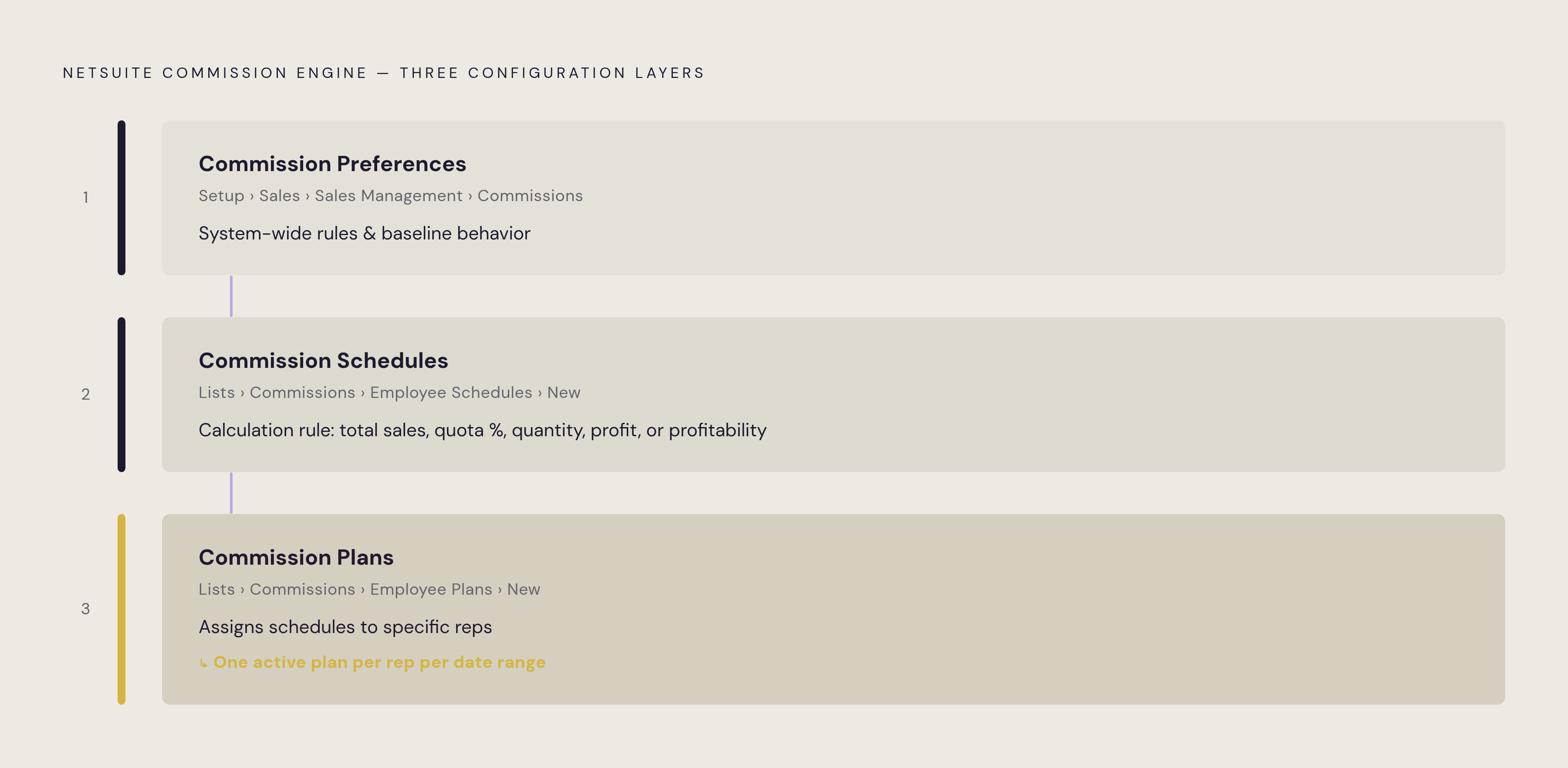
NetSuite ships with a commission engine that ties calculation directly to transactions already recorded in the system, so the financial record itself triggers the calculation. Administrators turn this on under Setup > Company > Setup Tasks > Enable Features, on the Employees subtab, where they enable the Employee Commissions feature; the NetSuite Applications Suite documentation describes this setup path. Companies that pay partners for sales referrals can also enable a separate Partner Commissions & Royalties feature, but the core engine for sales reps runs through three layers of configuration that build on each other in sequence.
The first layer is commission preferences, the system-wide rules that govern how and when commissions get paid across the organization. These live at Setup > Sales > Sales Management > Commissions, and they set the baseline behavior that everything else inherits.
The second layer is commission schedules, created at Lists > Commissions > Employee Schedules > New. A schedule is the actual calculation rule: total sales, percentage of quota met, quantity sold, total profit, or profitability. This is where the compensation logic gets defined in concrete, auditable terms rather than a spreadsheet formula only one person understands.
The third layer is commission plans, which you assign at Lists > Commissions > Employee Plans > New. A plan takes one or more schedules and assigns them to specific reps, and a single plan can hold multiple schedules at once. A rep cannot be assigned to more than one commission plan for the same date range. Overlapping plans create exactly the kind of ambiguity the ERP-sourced approach is meant to eliminate, so plan structures need to be built around that limit from the start.
The documentation describes this three-layer structure as built to handle genuinely complex compensation plans, not as a stripped-down approximation that only works for simple flat-rate deals. And because calculation runs continuously against live transaction data, reps see estimated and actual commission in real time on their NetSuite dashboard. Commission becomes a KPI reps can check the way they'd check quota attainment, rather than a number that only appears, unexplained, at the end of a pay period.
Team selling, split commissions, and collaborative deal credit in NetSuite
Single-rep commission math is one problem. Multi-contributor deals are a harder one, and it's where spreadsheet-based commission tracking tends to fall apart fastest, because splitting credit across a sales rep, a sales engineer, an account manager, and a manager by hand invites exactly the kind of error that triggers a dispute. NetSuite's Team Selling feature handles this at the transaction level.
The NetSuite Applications Suite Team Selling documentation states that the feature links sales transactions and customers to sales teams that can include sales reps, managers, engineers, account managers, and other employees who contribute to the sale. Enabling Team Selling (at Setup > Company > Enable Features > CRM, by checking the Team Selling box) changes the underlying data model in a specific way: the single Sales Rep field that used to sit on transactions and customer records gets replaced by a Sales Team subtab. Attribution moves from one rep per record to a team per record, which is a structural change, not a cosmetic one. Sales territories can route new leads, prospects, and customers to these teams automatically, so territory assignment ties directly to who's eligible for commission on a given account.
Enabling the feature also changes reporting. Sales by Sales Team Summary and Detail reports, along with Sales Orders by Sales Team Summary and Detail reports, appear automatically once Team Selling is on, so finance and sales leadership can pull team performance without a custom report build. Split commission estimates run within this same structure, connecting deal-level attribution directly to the calculation engine described above, with no separate manual step required to turn a shared deal into individual payouts.
One operational detail here carries real risk if you don't write it into policy. Changing the sales rep on a transaction removes the team selling information on that record and updates commission data to the new rep. That's a legitimate action in some circumstances, a deal gets reassigned, a rep leaves the company, but it's also a point where commission history can quietly shift if anyone with edit access can make the change. Organizations running Team Selling need a clear, written policy on who is allowed to change the rep field on a transaction and under what circumstances, because that single field edit can rewrite who gets paid for a deal after the fact. If Team Selling is later disabled company-wide, NetSuite keeps the sales team data for transactions entered while the feature was active, so commission and quota figures for those earlier periods stay intact.
Bidirectional sync: delivering ERP data to Salesforce commission workflows
Most sales organizations run their day-to-day sales motion in Salesforce or a comparable CRM, a legitimate operational reality that the design needs to accommodate. NetSuite's financial events, an invoice getting created, a payment getting received, need to become visible to reps and managers working in Salesforce without the reverse happening: CRM edits overwriting values that the ERP is supposed to control.
A bidirectional, real-time sync is what makes that possible. Breadwinner for NetSuite, for instance, is a Salesforce-native managed package installed from the AppExchange that syncs NetSuite records, Companies (Customers), Contacts, Estimates, Sales Orders, Invoices, Items, and Fulfillments, along with Payments and Credit Memos, onto corresponding Salesforce records in near-real time. It supports multi-subsidiary and multi-currency environments, and it runs with no separate middleware layer sitting between the two systems.
Good integration design doesn't force a CRM deal amount and an ERP invoice total to match exactly, and that's deliberate. Tax, shipping, discounts, partial billing, and currency conversion can all cause the two figures to differ for entirely legitimate reasons. An integration that overwrites one number to force equality with the other destroys the distinction between what a deal was expected to be worth and what it actually billed for, and commission calculation needs that distinction preserved, because the triggering amount for payout has to be defined with precision, not approximated by forcing two systems to agree.
A sales outcome gets approved in Salesforce, which creates or updates a customer and a sales order in NetSuite. When payment later comes in against that order in NetSuite, the payment status updates back in Salesforce. The rep sees that their deal has been paid without ever opening the ERP. The financial event becomes visible where the rep already works, and the ERP stays the single source of truth for whether the money actually arrived.
What makes commission data from an ERP integration auditable and dispute-resistant
An ERP-sourced commission workflow can be traced, step by step, after the fact. Every payout connects back to a specific transaction, a specific calculation rule that ran against it, and a specific approval event, and a spreadsheet-based process has none of those three things. In a spreadsheet, when a rep questions a payout, the only artifact anyone can point to is the final number in a cell. There's no record of which formula version calculated it, what data fed into that formula, or who last touched the sheet. A dispute in that environment gets settled by whoever has more authority in the room, not by evidence.
NetSuite's commission module avoids that failure mode by tying every calculated commission back to the transaction record that generated it, and the approval process itself can require specific approvers, a sales manager, someone from accounting, before a payout is released. Manual overrides are still allowed inside that workflow, and that's a deliberate design choice rather than a loophole: an override gets logged as a documented decision, with a record of who made it and when, instead of disappearing as a silent edit to a formula buried three tabs over in a shared file. Role-based access reinforces the same principle. Executives see total commission cost, managers see their team's numbers, reps see their own figures, and that separation is enforced by the system's permission structure, not by hoping nobody with a spreadsheet link decides to look further than they should. Corrections for overpayment or underpayment get handled as explicit debits and credits in the following cycle, a visible adjustment with its own record, rather than a quiet rewrite of a number from a prior period.
The clearest sign of what happens when none of this exists is a practice sometimes called shadow accounting: reps keeping their own parallel spreadsheet, recalculating their own commission independently because they don't trust the number finance hands them. It's a rational response to a process that gives reps no visibility into how their pay was calculated. Real-time access to estimated and actual commission on the NetSuite dashboard removes the reason for that shadow spreadsheet to exist in the first place, because the rep can watch the same number finance will eventually use, updating as the underlying transactions update, well before the pay period closes.
Commission software beyond NetSuite's native module
NetSuite's native commission module covers a wide range of compensation structures well, built directly on schedules and plans that handle total sales, quota attainment, quantity, and profitability. It reaches a limit for some organizations, though, and recognizing where that limit sits matters more than defaulting to either option out of habit.
The clearest limit appears when a company runs Salesforce as its primary CRM and NetSuite as its ERP and depends entirely on the quality of the sync between them for commission accuracy. A dedicated commission platform, built to ingest data from both systems and reconcile it as part of its own calculation workflow, gives that organization a place to resolve mismatches between CRM and ERP data as a defined step, rather than hoping the integration never produces an edge case.
Plan complexity is the other place native schedules can run out of room. Accelerators with multiple tier breakpoints, SPIFs tied to short-term campaigns, draw-against-commission arrangements, and clawback rules triggered by customer churn all ask more of a calculation engine than NetSuite's standard schedule types were built to express. Some of these can be configured within the ERP module with enough effort; others are better served by a platform built specifically around that kind of plan logic. Finance teams also increasingly want a formal separation between configuring a plan, reviewing a calculation, and exporting approved numbers to payroll, three distinct stages with their own permissions, mirroring how payroll itself gets handled. That kind of staged workflow should be weighed against what NetSuite's module provides natively.
None of this makes the decision between native and dedicated a question with one correct answer in the abstract. It depends on whether an organization's plan complexity, its number of source systems, and its audit requirements are already satisfied by what the ERP module delivers today. Map that honestly, plan type by plan type and system by system, before deciding to build on top of NetSuite's module or layer a dedicated platform over it. Any platform under consideration, native or third-party, should also meet baseline requirements for data handled as payroll-adjacent information: encryption in transit and at rest, tenancy scoped to a single organization, and a clear policy against training external models on customer data. You confirm those before any commission data moves through the tool.
Setup requirements and practical steps for getting the sync right
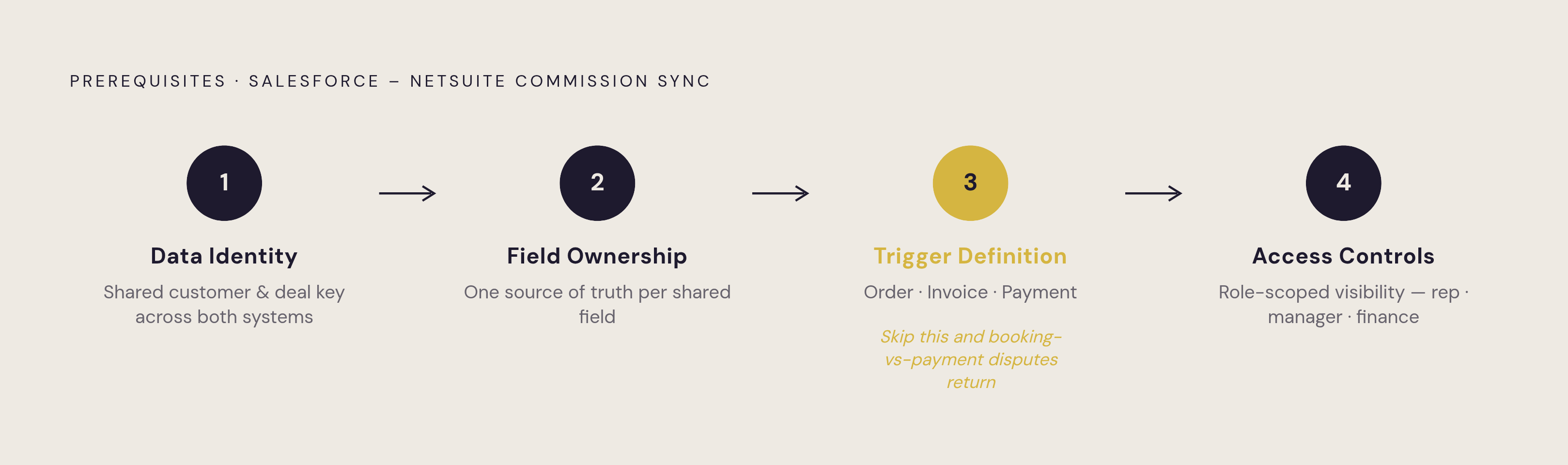
Four prerequisites need to be settled before any commission sync configuration begins, and skipping any one of them tends to recreate the exact reconciliation problems the sync was supposed to solve.
Data identity comes first: Salesforce and NetSuite need a confirmed, consistent way to recognize the same customer and the same deal across both systems, so a sync doesn't create duplicate records or silently fail to match an invoice to the opportunity it came from.
Field ownership comes next: every field that could exist in both systems, deal amount, close date, customer name, needs one system designated as its source of truth, with the other system treated as a read-only mirror of that field.
Trigger definition is the step most directly tied to commission accuracy. The organization has to decide explicitly which financial event triggers commission, sales order creation, invoice issuance, or payment receipt, and confirm that the chosen event exists as a concrete, mappable object inside whichever integration method is in use. Leaving this ambiguous produces the booking-versus-payment dispute this entire piece has been describing.
Access controls close out the list. Before commission features get turned on, role-based permissions need to be set so reps see only their own numbers, managers see their team's, and finance sees total cost, matching the same access structure that makes the resulting commission data defensible once reps and auditors start asking questions about it.